
Safety Data Sheets (SDSs)
Safety Data Sheets (SDSs) are important hazard communication documents that provide comprehensive safety information, such as hazards, safe handling, storage, disposal, and emergency measures, for products such as chemical substances and mixtures.
There are 2 options to download the SDSs of products from Wilhelmsen Ships Service.
Option 1: Downloading Safety Data Sheet (SDS) from Product Catalogue
1. Search for your product of interest in the search bar located on the top right of the online product catalogue, using product name or product number.
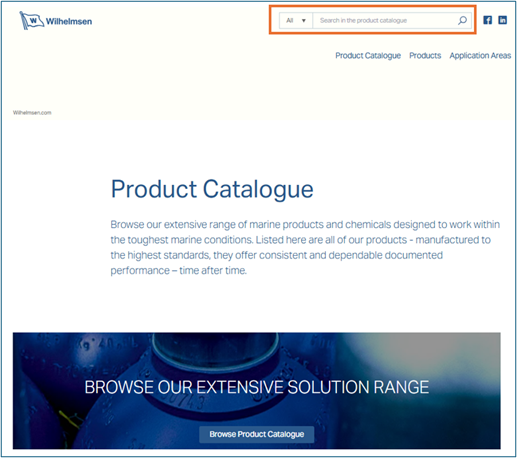
2. Select the product of interest from the search result.
3. For applicable product, you can scroll down the page to find the section on Safety Data Sheet (SDS).
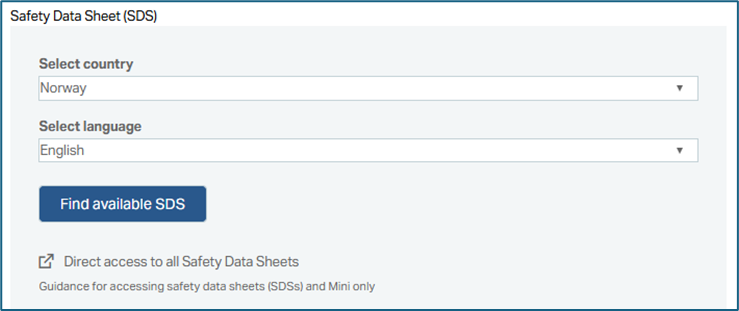
4. Select the desired country according to the rules and regulations you want to have the full SDS.
5.Select the desired language. English is always available besides the local language of the selected country in Step 4.
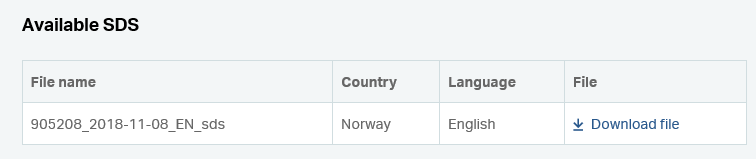
6. Click on “Find available SDS” to display a list of available records that is shown with the option to download the file in pdf format.
Example:
Option 2: Downloading Safety Data Sheet (SDS) from Outback
All SDSs are also available in Outback and you have the option to download multiple documents at one go.
1. On the search bar to the upper left of the Outback webpage, select the category “Name” to search using product name or “Part No” to search using product number. If the product number is not known, enter as much of the product name as possible.
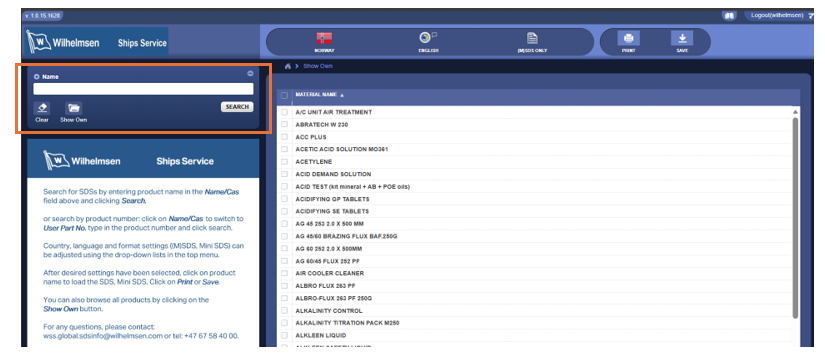
2. To browse all products, click on the “Show Own” button.
3. Adjust country, language and SDS type (M(SDS) or Mini SDS) using the drop-down list located in the top area of the menu.
4. Click on the desired product name from the search result to load the SDS.
5. Download/save the SDS in pdf format.
Note: In addition to the full SDS, a Mini SDS is also available in Outback for download by selecting the SDS type. The Mini SDS is a one-page, color-coded hazard summary derived from the full SDS that is generally useful for quick reference in the workplace. It is provided voluntarily as an extra resource and does not replace the full SDS.
Need help?
If you have any questions or concerns regarding our SDS or Mini SDS, or are looking for a product that is not listed in this database, please reach us here:
Global Product Compliance Manager
Email: wss.global.sdsinfo@wilhelmsen.com
Tel: +47 67 58 40 00